

It started like nothing unusual. No alerts. No warnings. No sign that anything was wrong. Just a normal-looking email landing in inboxes.
And that is exactly what made it dangerous.
A few users reported login issues shortly after. Some could no longer access their accounts. Others had already entered their credentials without thinking twice. That was the moment it stopped being “just an email” and became an investigation.
The Incident
The email looked convincing at first glance. It carried a financial tone, used a subject like Direct Credit Advice, and appeared to come from a corporate sender. There was an attachment, which made it feel routine, almost expected in a finance-related context.
Nothing immediately triggered suspicion.
But that is how these attacks are designed.
Underneath that simplicity was a full phishing operation waiting to unfold.
Real-World Context (Why This Matters)
This pattern is not theoretical. It reflects how modern phishing campaigns operate in the real world.
In 2026, attackers leveraged trusted infrastructure such as Microsoft Azure Monitor alerts to deliver phishing emails that bypassed traditional defenses. These messages looked legitimate because they were built on platforms users already trust. Read the full story here
The objective is always the same. Gain trust. Capture credentials. Move deeper into the environment.
What this lab demonstrated is not a simulation of possibility. It is a reflection of reality.
Stage 1: Looking Beyond the Email Surface
Instead of trusting how the email looked, I focused on how it was delivered.
📸 Evidence — Email Artifacts
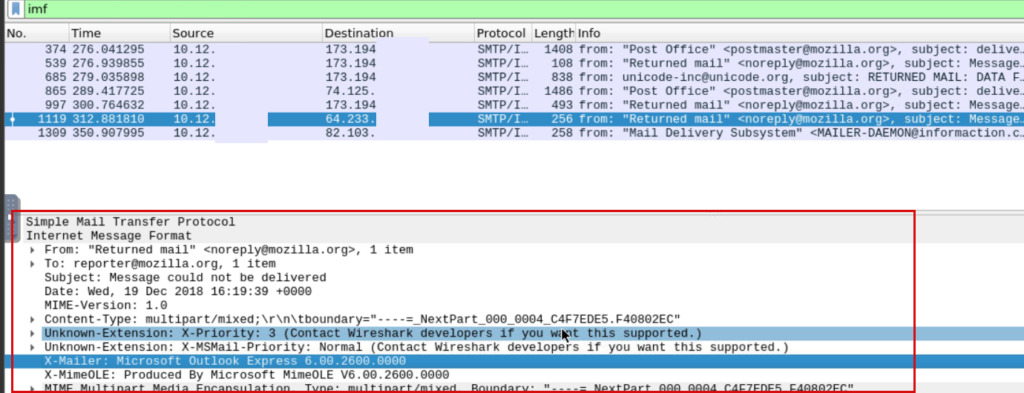
SMTP packet inspection revealing email header artifacts, useful for tracing phishing email delivery and spoofing indicators.
Headers do not lie. They revealed inconsistencies in the sender’s origin and routing path. What appeared legitimate on the surface began to break apart when viewed from a technical perspective.
That was the first real indication that something was wrong.
Extracting What Actually Matters
At this point, the goal shifted from reading the email to extracting indicators.
📸 Evidence — Indicator Extraction
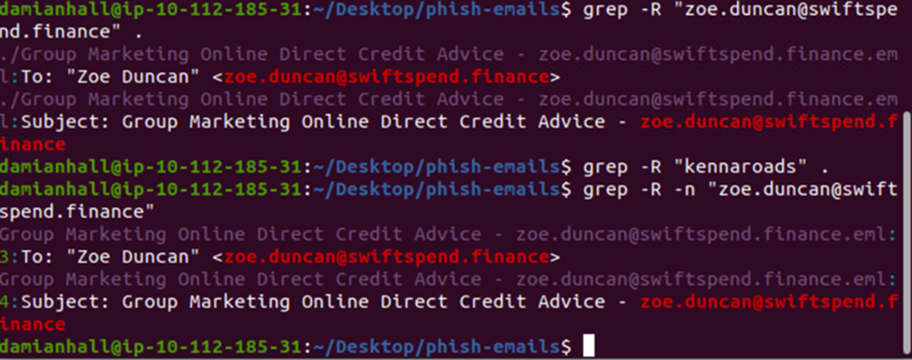
Using grep to extract phishing indicators such as targeted email addresses from collected artifacts.
Patterns started to emerge. Email addresses. Naming structures. Repetition. These are the small details that turn a single suspicious email into something traceable and actionable.
The Lure
Looking back at the email content itself, there was nothing overly aggressive about it.
📸 Evidence — Phishing Email
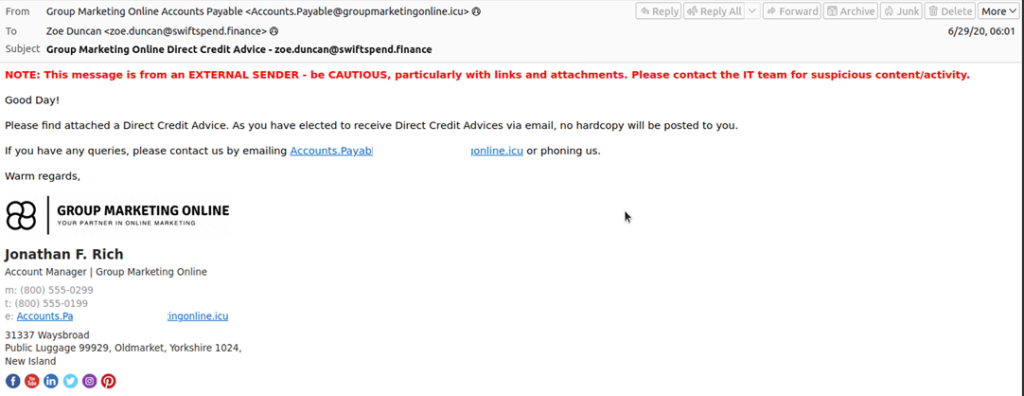
Phishing email impersonating a financial notification, using urgency and external sender indicators to lure the recipient.
It did not rely on fear alone. It relied on familiarity. A financial message. A routine update. A tone that feels normal enough to trust.
That is what makes phishing effective.
Attackers are no longer trying to look suspicious. They are trying to look expected.
Stage 2: Redirect Into the Trap
The attachment did not contain malware. Instead, it redirected users to a phishing page designed to mimic a legitimate login flow.
The URL structure itself was a clue. It attempted to imitate a Microsoft-related path while quietly redirecting users to attacker-controlled infrastructure.
This is where trust is converted into action.
Stage 3: Inside the Phishing Kit
Exploring the backend revealed that this was not a simple page. It was a structured phishing kit.
Files such as submit.php, resubmit.php, and index.php were all part of a controlled flow designed to capture and validate user credentials.
This was organized. Intentional. Built for reuse.
Stage 4: Credential Harvesting Logic
The first submission endpoint captured user input directly.
Email. Password. IP address. User agent. Even geographic data.
All of it packaged and sent out.
What stood out was not just the collection, but the validation process.
Victims were prompted to enter their credentials again if needed.
Not because the system failed.
But because the attacker anticipated human error.
Stage 5: Where the Data Goes
Instead of complex infrastructure, the exfiltration method was simple.
Credentials were sent directly to an external email address controlled by the attacker.
No database. No dashboard.
Just a collection point.
Simple systems are often the hardest to detect because they do not create much noise.
Where the Impact Becomes Real
At this stage, I shifted focus to the network layer.
Not the email. Not the page.
The traffic.
📸 Evidence — Credential Exposure
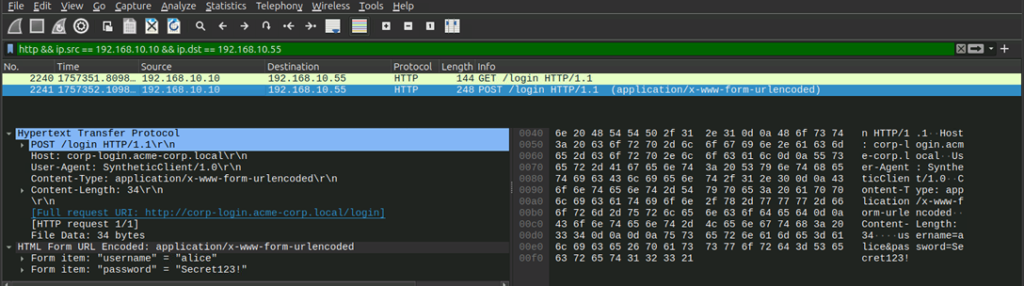
Captured HTTP login request exposing credentials in cleartext, demonstrating the risks of unencrypted authentication traffic.
There it was. Credentials moving across the network in plain text.
Readable. Interceptable. Already gone.
There was no exploit involved. No malware executing in the background.
Just a user submitting information to a system they believed they could trust.
The Full Attack Chain
When viewed as a whole, the process becomes clear:
Email → Attachment → Redirect → Fake Login Page → Credential Submission → Exfiltration
Each step is simple on its own.
Together, they form a complete attack.
Detection Opportunities (Blue Team Takeaways)
Looking back, there were multiple points where this could have been detected or stopped.
Email-level controls could flag SPF or DMARC failures. Financial-themed emails carrying HTML attachments should raise suspicion. Lookalike domains and unusual redirects can be monitored.
At the network level, outbound credential submissions and abnormal POST requests to external domains are strong indicators.
Detection is not about catching one step. It is about recognizing the pattern across layers.
My Final Thoughts
This investigation changed how I look at phishing.
It is no longer just about suspicious links or malicious attachments.
It is about how trust is built, how it is exploited, and how easily normal behavior can be turned against the user.
Attackers are not always breaking systems.
Sometimes, they are simply using them as intended.
And in many cases, all it takes is one click.
View similar Lab: Network Traffic Analysis: Packets don't lie