


In the first part of this AWS Cloud Security series, I built a secure cloud environment from the ground up. Rather than relying on AWS's default networking configuration, I manually created a Virtual Private Cloud (VPC), configured public and private subnets, attached an Internet Gateway, created route tables, secured an EC2 instance with Security Groups, and deployed an Nginx web server.
That project helped me understand how cloud infrastructure is built.
This second phase shifted my attention to something even more important—protecting that infrastructure.
Deploying cloud resources is only one part of the job. From a Security Operations Center (SOC) perspective, every resource that is deployed must also be secured, monitored, and auditable. A cloud environment without proper identity management, access controls, logging, and monitoring can quickly become difficult to defend, even if the infrastructure itself is correctly configured.
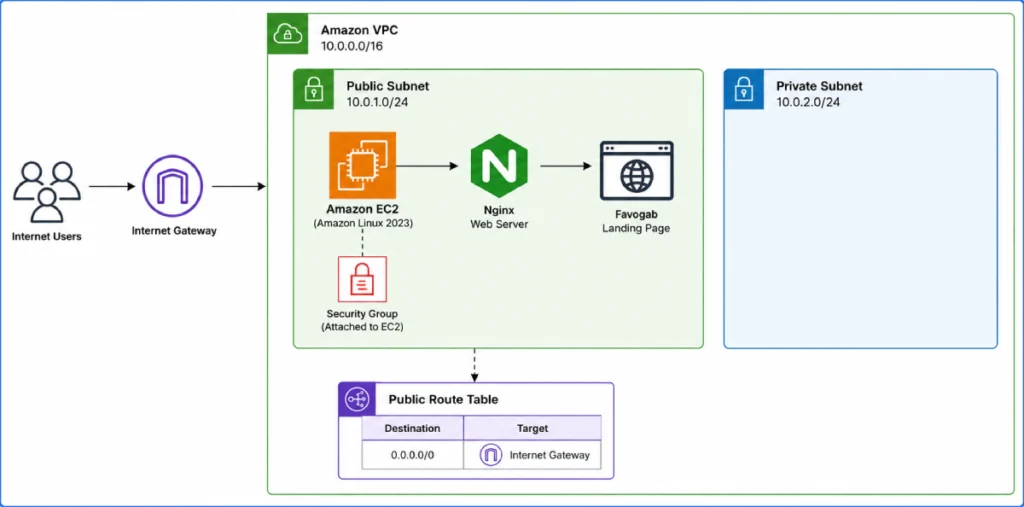
This case study documents that journey—from implementing Identity and Access Management (IAM), securing Amazon S3, validating least privilege, investigating CloudTrail logs, and exploring CloudWatch monitoring to better understand how AWS services work together to strengthen an organisation's security posture.
Project Objective
The objective of this project was to build upon the infrastructure deployed in Part 1 by implementing the AWS services most frequently encountered during cloud security investigations and day-to-day security operations.
The project focused on:
- AWS Identity and Access Management (IAM)
- IAM Roles
- Principle of Least Privilege
- Amazon S3 Security
- Block Public Access
- Server-Side Encryption
- AWS CloudTrail
- AWS CloudWatch
Together, these services form the foundation of cloud identity management, secure storage, audit logging, and operational visibility—skills that increasingly appear in SOC Analyst, Incident Response, and Cloud Security.
Securing Access with AWS Identity and Access Management (IAM)
With the infrastructure successfully deployed, my next priority was controlling who could access it and what they were allowed to do.
One of the biggest security mistakes in cloud environments is giving every administrator unrestricted permissions. While this approach may appear convenient during deployment, it significantly increases the impact of compromised credentials and accidental administrative mistakes.
To avoid this, I implemented the Principle of Least Privilege.
Rather than performing every task from a single administrative account, I created two separate IAM users with different responsibilities.
The first user, Admin, was assigned administrative privileges to manage the AWS environment.
The second user, Auditor, represented a security analyst whose responsibility was to investigate resources without making destructive changes.
Creating both users allowed me to experience AWS from two completely different perspectives.
As the administrator, I could provision resources, configure permissions, and manage services.
As the auditor, I was restricted to viewing resources and performing investigation-related activities.
Switching between both accounts highlighted how IAM policies enforce security boundaries and reduce unnecessary privilege within AWS environments.
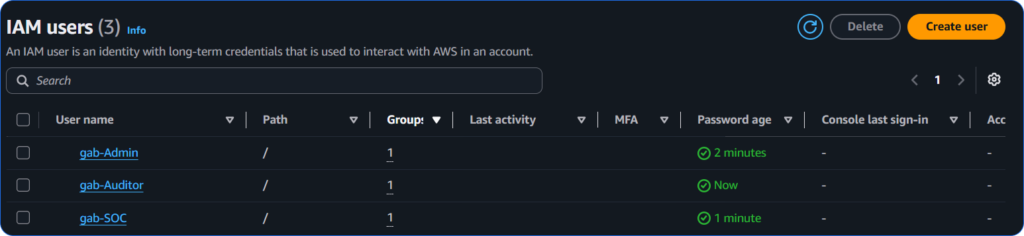
Screenshot: IAM Users
Implementing Least Privilege
Instead of granting excessive permissions to every user, I deliberately restricted the Auditor account.
The goal wasn't to prevent work from being completed—it was to ensure users could perform only the actions required for their responsibilities.
This is one of the core security principles used throughout modern enterprise environments.
To extend this concept further, I created an IAM Role for the EC2 instance and attached the AmazonS3ReadOnlyAccess managed policy.
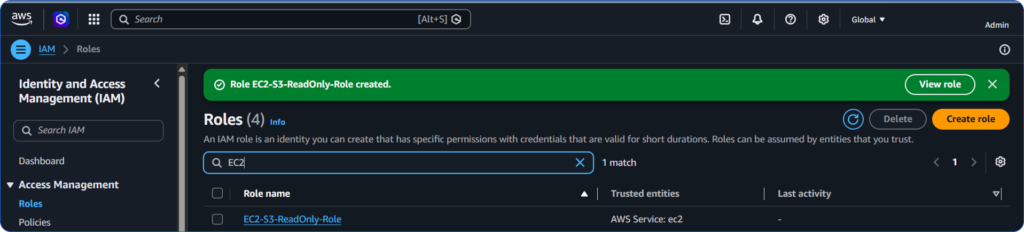
Using a role instead of embedding credentials directly on the server demonstrated AWS's recommended approach to secure authentication.
Rather than storing long-term access keys on the EC2 instance, temporary credentials are automatically provided whenever the instance needs to communicate with Amazon S3.
Besides reducing administrative overhead, this significantly decreases the risk of credential exposure.
It also reinforced an important lesson:
Identity management is just as important as network security.
Even perfectly configured infrastructure becomes vulnerable if identities are over-privileged.
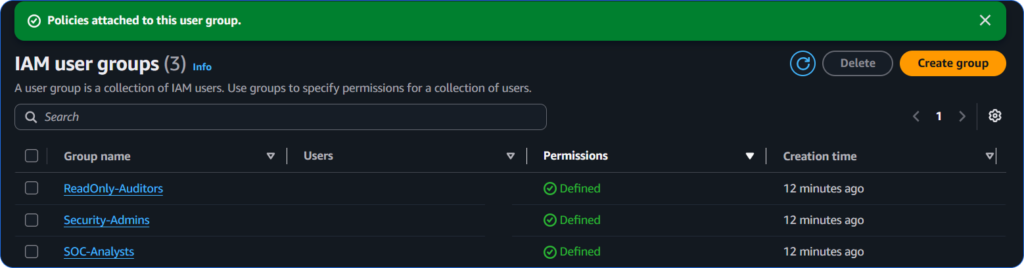
Screenshot: IAM User Groups Policies Attached
Securing Data with Amazon S3
With identities secured, the next step was protecting cloud storage.
Amazon S3 is one of AWS's most widely used services, making it a frequent target during both security assessments and real-world attacks.
Instead of immediately uploading files, I focused on securing the bucket first.
I created a General Purpose S3 bucket and enabled AWS's recommended security settings before storing any data.
These included:
- Block Public Access
- ACLs Disabled
- Server-Side Encryption (SSE-S3)
- Bucket Key Enabled
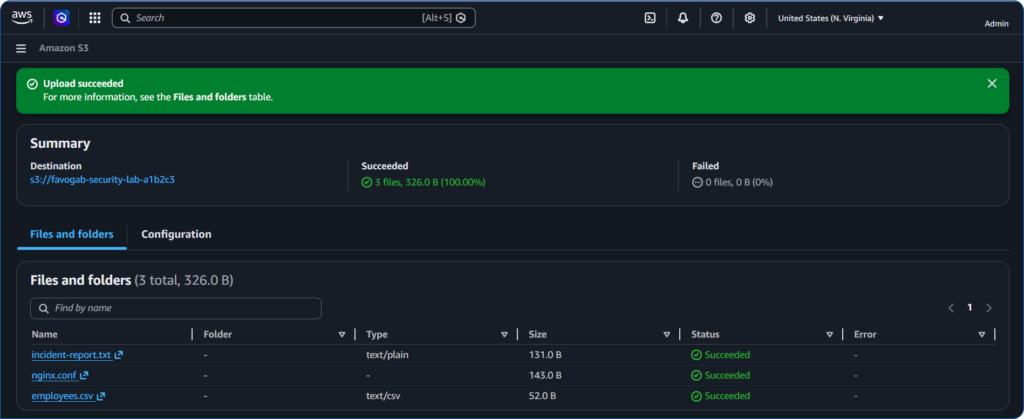
Only after confirming these settings were correctly configured did I upload several sample investigation files, including an incident report, an Nginx configuration file, and an employee CSV file.
Approaching the deployment this way reinforced an important security mindset:
Security should be configured before sensitive data is introduced—not afterwards.
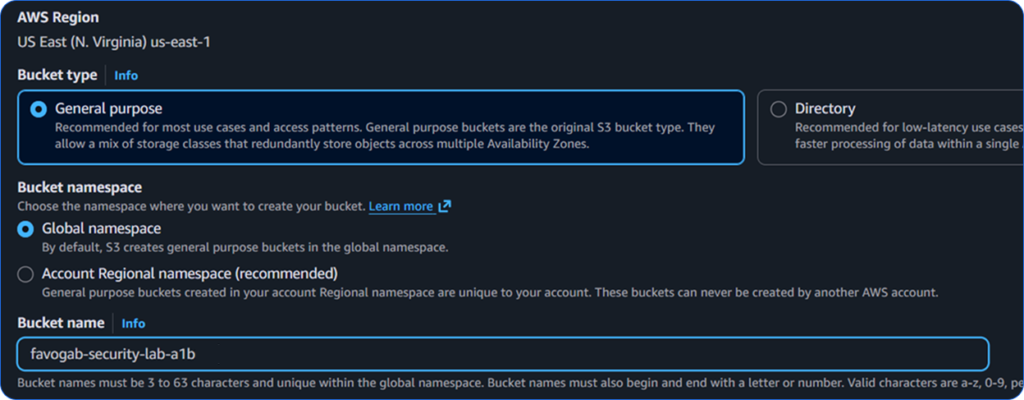
Screenshot: S3 Bucket Settings
Validating Least Privilege
Rather than assuming the IAM permissions worked correctly, I tested them.
After signing into the Auditor account, I attempted several actions against the S3 bucket.
Viewing the bucket contents worked exactly as expected.
Opening uploaded files also succeeded.
Downloading the CSV file was permitted because read access had been intentionally granted.
However, when I attempted administrative actions such as deleting bucket contents or modifying the bucket policy, AWS immediately returned Access Denied.
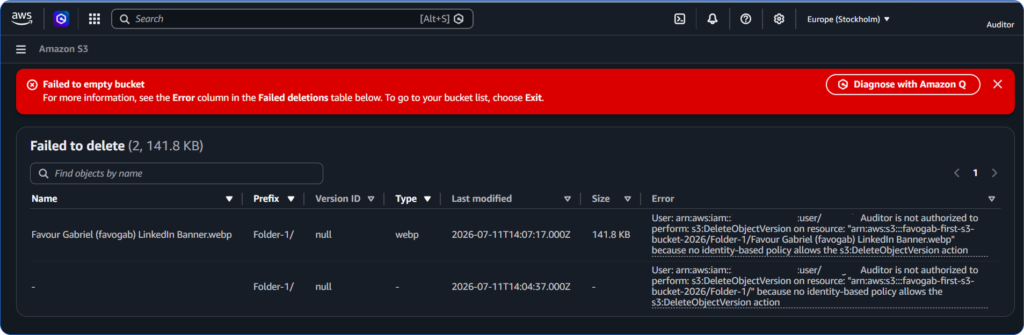
This was exactly the outcome I wanted.
Instead of viewing the denial as an error, I treated it as confirmation that the security controls were functioning correctly.
A well-designed permission model should make authorised work easy while preventing unnecessary or destructive actions.
Investigating Activity with AWS CloudTrail
Once the environment had been secured, I wanted to verify that every administrative action performed throughout the project had been recorded.
Rather than assuming audit logging was working correctly, I investigated AWS CloudTrail Event History.
The event history immediately showed a detailed timeline of actions performed during the deployment.
I reviewed events including:
- CreateBucket
- PutBucketEncryption
- PutBucketPolicy
- TerminateInstances (Denied)
Each event contained valuable forensic information such as:
- Username
- Event Time
- AWS Service
- Source IP Address
- Event Name
- Request Parameters
- Error Codes
One event stood out during the investigation.
Earlier in the lab, I deliberately attempted to apply a public bucket policy.
AWS rejected the request because Block Public Access was enabled.
CloudTrail recorded both the failed request and the associated AccessDenied error.
From a SOC perspective, this demonstrated that failed actions can be just as valuable as successful ones.
They provide evidence of attempted changes, support incident investigations, and help analysts understand what happened during a security event.
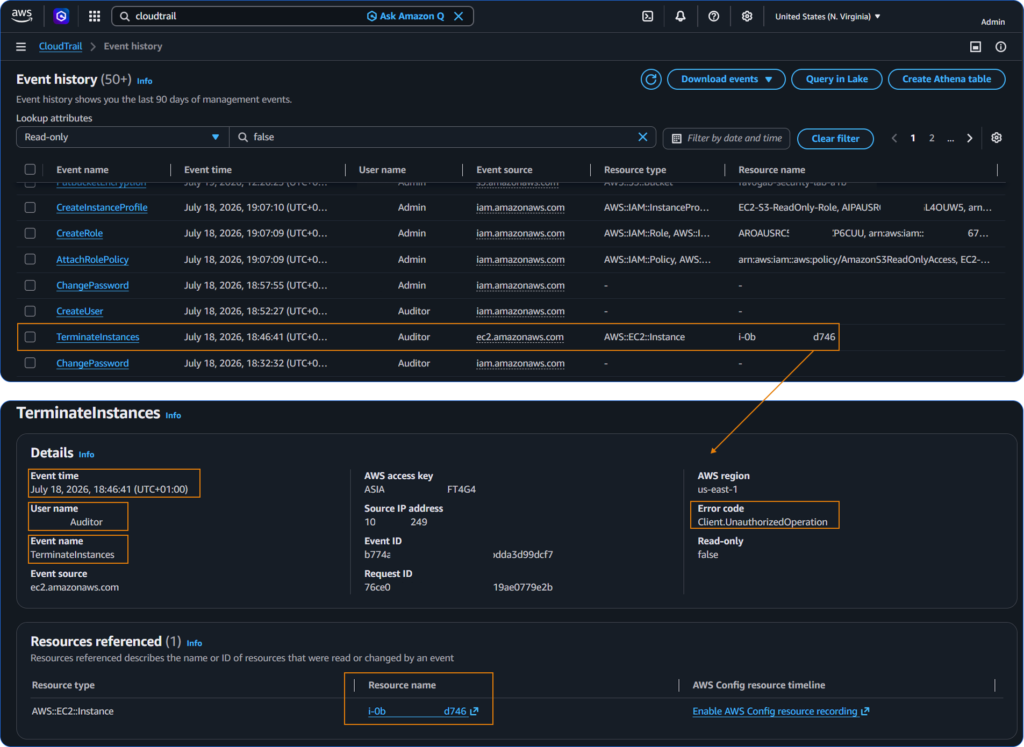
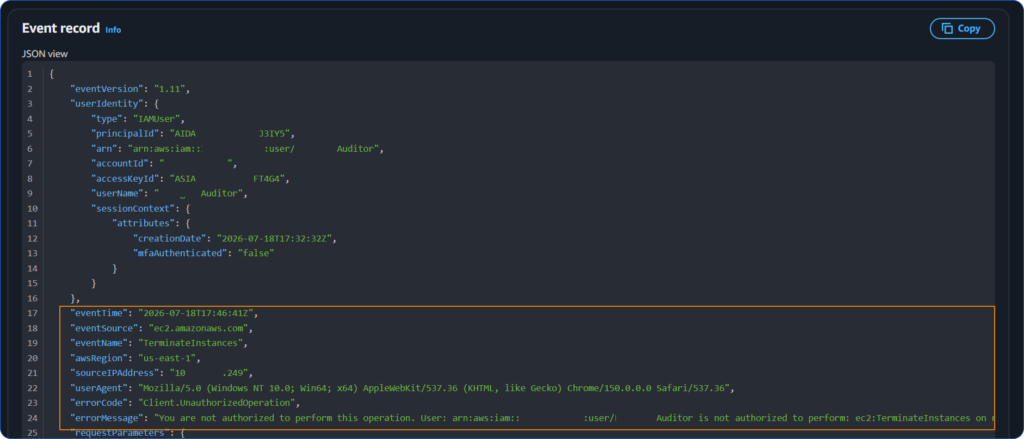
Screenshot: CloudTrail Event History
Understanding CloudWatch
CloudTrail tells security teams what happened.
CloudWatch helps them understand what is happening now.
Although I did not build complex monitoring rules during this project, exploring CloudWatch helped me understand how AWS monitors operational health through metrics, dashboards, and alarms.
In a production environment, CloudWatch alarms can detect unusual behaviour and automatically notify administrators using Amazon SNS.
Understanding this relationship completed an important part of the AWS security picture.
Audit logs explain the past.
Monitoring provides visibility into the present.
Together, they improve an organisation's ability to detect and respond to security events.
Challenges
During testing, an attempt to apply a public bucket policy was rejected due to Block Public Access. Investigation confirmed that AWS security controls correctly prevented the configuration change while simultaneously recording the failed request within CloudTrail.

Future improvements should include:
- Amazon SNS for automated notifications
- Amazon GuardDuty for threat detection
- Amazon Inspector for vulnerability management
- AWS Config for configuration compliance
- IAM Access Analyzer for permission analysis
- Amazon Macie for sensitive data discovery
- AWS Security Hub for centralised security visibility
Final Thoughts
This project helped me move beyond infrastructure deployment and into the day-to-day responsibilities of securing an AWS environment.
Instead of simply learning how to provision cloud resources, I gained practical experience implementing identity management, protecting cloud storage, validating permissions, investigating audit logs, and understanding the role of continuous monitoring in cloud security operations.
More importantly, it reinforced an important lesson: cloud security is built through layers. Identity management, secure storage, audit logging, and monitoring each play a different role, but together they create a resilient security foundation.
As I continue building this AWS Cloud Security series, I now have a practical understanding of how the core services security teams interact with every day fit together. The next stage of my journey is to expand this foundation by exploring the broader AWS security ecosystem:
SNS  >>> Notify the Security Team

GuardDuty  >>> Detect Suspicious Activity

Inspector >>> Find Vulnerabilities

AWS Config >>>Track Configuration Drift

IAM Access Analyzer >>> Identify Excessive Permissions

Amazon Macie >>> Detect Sensitive Data

Security Hub >>> Centralise Security Findings
Building this knowledge one service at a time has helped me understand not only how AWS resources are deployed, but also how they are secured, monitored, and investigated from the perspective of a modern SOC Analyst. It has also shown me that effective cloud security isn't about mastering every AWS service at once—it's about understanding how each security layer contributes to protecting the environment as a whole.
Want to see more of my practical labs: Visit my everyday Cyber Playground